Part of our “Prompt Engineering Series”
Every interaction with AI starts with a prompt.
It might look like a quick question or a full set of instructions. Either way, the quality of your prompt determines the quality of the output. Strong prompts help the model understand your intent, follow your logic, and produce results you can use in real work.
This article is the opening piece in our larger series. The goal is simple: give you the four core prompt types that produce reliable outcomes in everyday business tasks. These are the techniques teams rely on when they want consistent, professional results without getting technical.
To make the differences clear, every section below uses the same scenario.

The Four Prompt Techniques You Need First
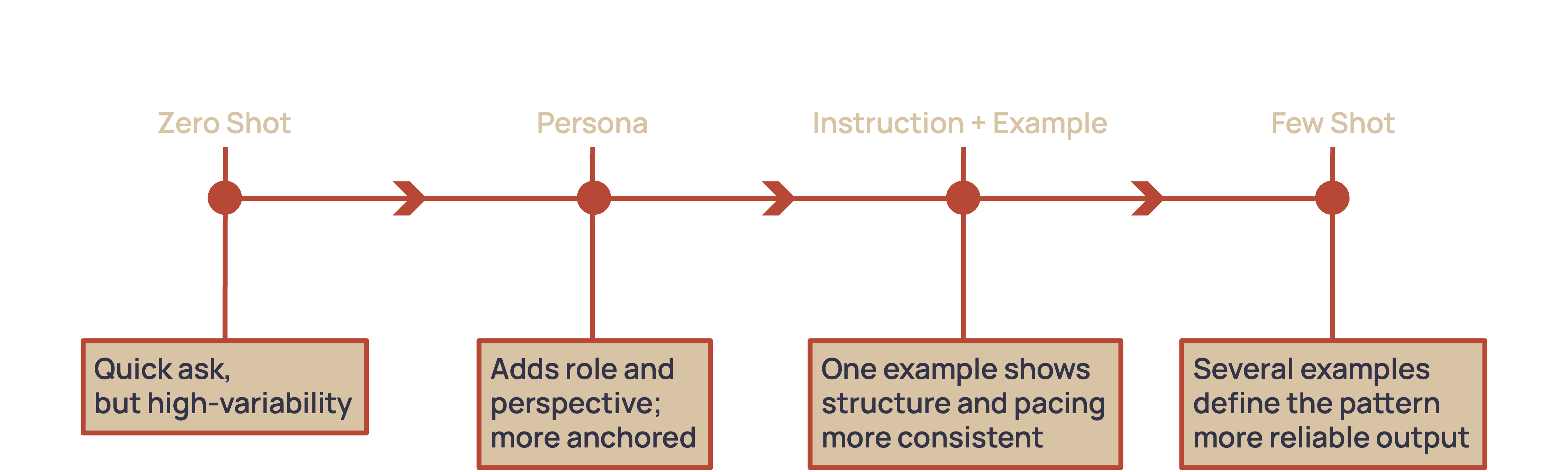
We’ll look at four prompt types and show how each one changes the response the AI gives:
- Zero Shot Prompting
- Role or Persona Prompting
- Instruction with Example
- Few Shot Prompting
1) Zero Shot Prompting: The Quick Ask
What it is: A direct instruction with no examples or setup.
When to use it: Fast drafting, quick summaries, polishing text, or any situation where you want something simple and straightforward.
Prompt: “Write a short explanation for staff about how the new intake workflow will function.”
Output (typical): “A new intake workflow has been created to help streamline how requests come into the team. Staff will enter requests into the updated form and the system will route them to the right person.”
Why it works: You get speed and simplicity. This is your starting point whenever you want something drafted quickly.
Before vs After:
- Before: “Explain the new intake workflow.”
- After: “Write a short explanation for staff about how the new intake workflow will function.”
2) Role or Persona Prompting: Setting the Voice
What it is: You assign the AI a role. This anchors tone, perspective, and expertise.
When to use it: Communications that need a specific voice, messages that must feel consistent and credible, or anything staff facing or client facing.
Prompt: “You are an operations manager. Write a clear and practical explanation for staff about how the new intake workflow will function. Focus on what changes for them and what they need to do.”
Output (typical): “As part of our process update, we are moving all intake requests into a single form. Staff will enter each request into the form and select the appropriate category. Once submitted, the request is routed automatically to the right team member. This creates a single source of truth and removes the need for email handoffs.”
Why it works: You steer the model into the right tone and keep the explanation grounded in real operational steps.
Before vs After:
- Before: A generic summary anyone could have written.
- After: A message written like an operations manager with details about actions, responsibilities, and expectations.
3) Instruction with Example: Show and Tell
What it is: You give the model a rule and one example. This anchors structure and tone better than instruction alone.
When to use it: Messages that must follow a format, communications where you care about voice or structure, or anything staff will read and reference later.
Prompt: “Explain the new intake workflow for staff using this style:
Example:
‘Here is what is changing. Here is why it matters. Here is what you need to do today.’
Now write your explanation for the workflow update using that same structure.”
Output (typical):
“Here is what is changing. All intake requests will move to the new form so we can capture consistent information and reduce back-and-forth messaging.
Here is why it matters. This gives us a single process that removes errors and speeds up response times.
Here is what you need to do today. Begin submitting all incoming requests through the form and choose the correct category so it is routed accurately.”
Why it works: The example signals structure, voice, and pacing. The model knows exactly what “good” looks like.
Before vs After:
- Before: Free-form explanation with no predictable framing.
- After: Clean, structured messaging modeled on your example.
4) Few Shot Prompting: Teach by Pattern
What it is: You provide two or three examples that demonstrate the pattern you want. The model learns from the examples and replicates them.
When to use it: Staff updates, recurring email formats, or any communication that needs predictable structure. It’s ideal for companies creating repeatable templates.
Prompt: “Here are two examples of how we explain workflow changes to staff.
Example 1: ‘The new reporting view is live. It reduces duplicate entries and helps teams see status updates in one place. Please begin submitting all updates through the view.’
Example 2: ‘We updated the handoff checklist. It removes steps that caused delays and gives us a clear review process. Use the updated checklist for all new tasks starting today.’
Using these as the model, write an explanation for how the new intake workflow will work.”
Output (typical): “The new intake workflow is now active. It gives us a single entry point for all requests and reduces the need for email follow-ups. Begin entering each request in the form and choose the correct category so it routes to the right person.”
Why it works: Examples give the model a miniature training set. Tone, structure, and brevity become consistent.
Before vs After:
- Before: Variable tone and structure from prompt to prompt.
- After: A message that matches the patterns in your examples.
Bringing It All Together
These four techniques are the foundation of effective prompting. They help you move from vague instructions to clear outputs that your team can use immediately. As you practice, you’ll see how small adjustments to clarity, tone, and examples raise the quality of AI responses.
This article is the first installment in our Prompt Engineering series. The next pieces will cover advanced methods that help AI reason, debate, and explore options. Those approaches build on the foundations you learned here.
If you want help applying these methods to your team’s workflows, SkyeStaq can guide you. Our focus is helping organizations communicate clearly with AI so they get reliable results, consistent messaging, and streamlined operations.
Prompting is simply directing the model with the clarity you expect from any trusted teammate.